Guide · Guest
How to cancel your booking

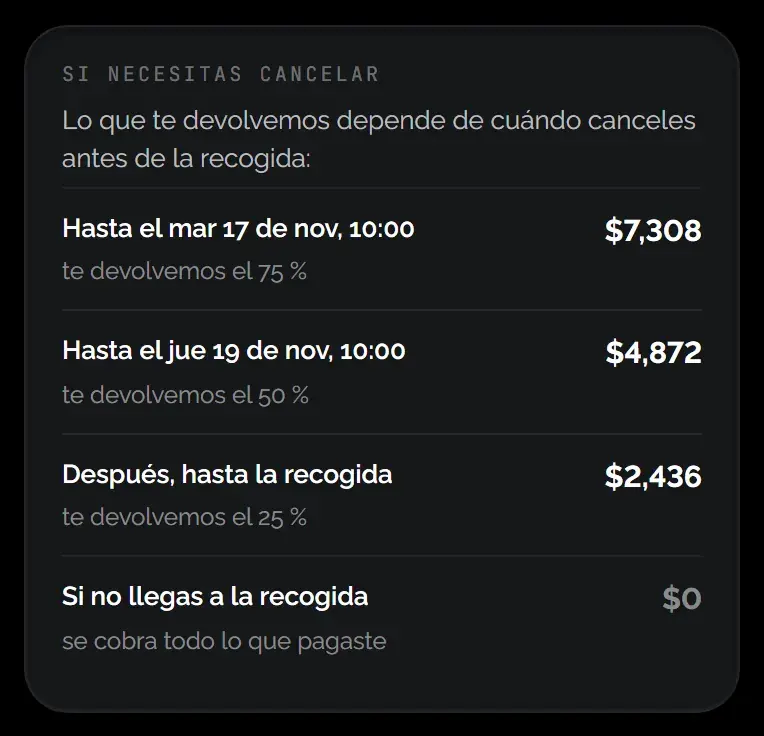
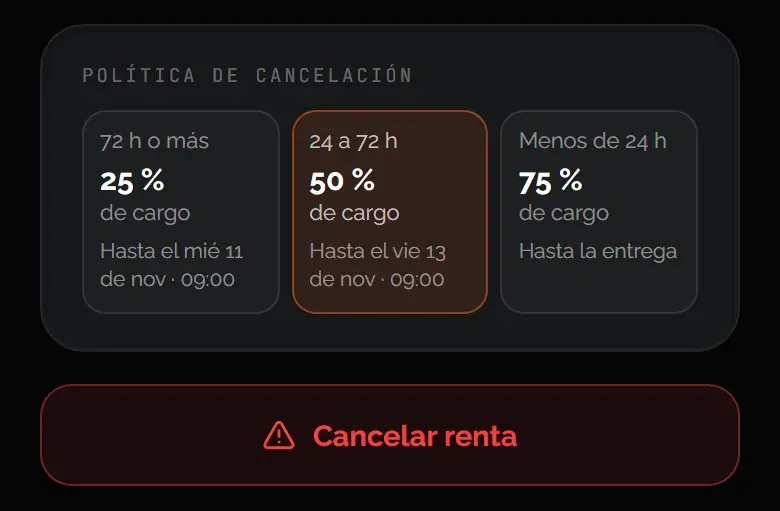
You cancel from your rental. What’s charged depends on how long is left before pickup, and the rest goes back to the same payment method.
- 25%: with 72 hours or more left
- 50%: with 24 to 72 hours left
- 75%: with less than 24 hours left
What’s charged
The charge is a percentage of the total you paid, home delivery included. It’s counted from the pickup time. The security deposit isn’t part of it: it’s a hold on your card, not a charge.
How to cancel
- Open your rental: Go to My rentals and choose the booking.
- Tap “Cancel rental”: Check the charge and what you get back.
- Confirm: We email you the confirmation and the provider is notified.
When you see your refund
The refund is issued as soon as you cancel, to the same card. It shows on your statement in 5 to 10 business days, depending on your bank. Anything you paid with KORU credit goes back to your balance.
If the provider or KORU cancels
There’s no charge: you get everything back.
Learn more: How refunds work
Was this helpful?
Related articles
- Guide · GuestHow refunds work
It goes back to the card you paid with, in 5 to 10 business days.
- Guide · GuestHow the deposit works
It’s a hold on your card, not a charge. Here’s when it’s released.
- Guide · GuestIf you miss the handover
What happens if you don’t show up, and how to dispute it.