Guide · Guest
What the price you see includes

Before you pay, you see the full breakdown. The total already includes VAT and stays fixed in your rental.
- 16%: VAT (IVA), already in the total
- Itemized: subtotal, VAT and total, line by line
- Separate: the deposit: it isn’t a charge
How the total is built
- Daily rate × days: this is the subtotal, before VAT.
- VAT (IVA, 16%): calculated on that subtotal.
- Home delivery: shown as a separate line only when it has a price for your address.
- Total (VAT included): this is what you pay.
On the cards and on the vehicle page, the daily price already includes VAT. When you pay, VAT is calculated once on the subtotal for the whole rental, with the same rounding used for the charge.
The breakdown you see when paying is the one saved in your rental. It isn’t recalculated later.
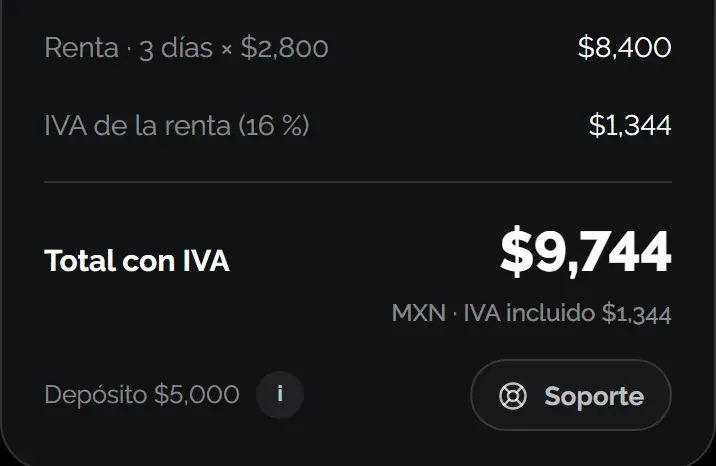
The deposit isn’t added
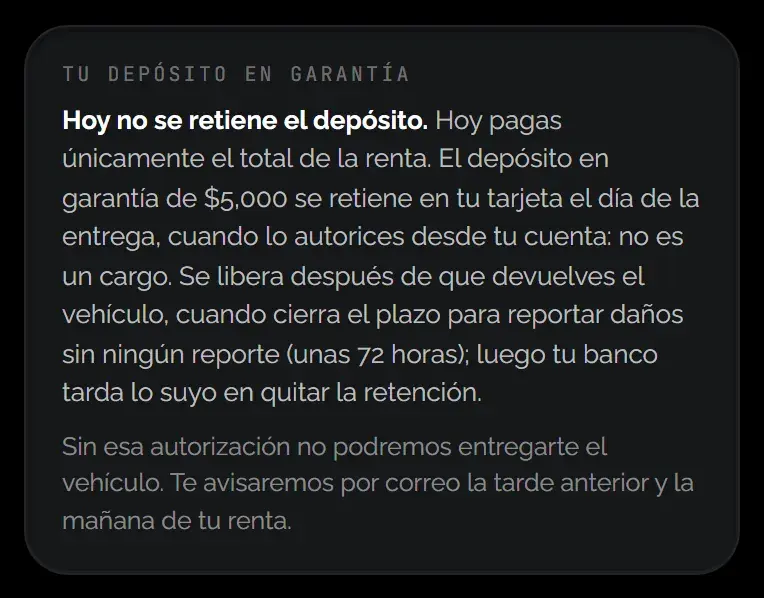
If the vehicle requires a deposit, you see it below the total. It isn’t held when you pay: you authorize it close to handover, and it’s held on your card, not charged.
KORU credit
If you have KORU credit available, it’s deducted from the total automatically and you see what’s left “To pay by card”.
Learn more: How the deposit works
Was this helpful?
Related articles
- Guide · GuestHow you pay for your rental
By card, online, when you confirm your booking.
- Guide · GuestHow to book, step by step
From the vehicle to payment, without talking to anyone.
- Guide · GuestBooking for today or for several days
From 30 minutes after booking, for as many days as the vehicle is free.